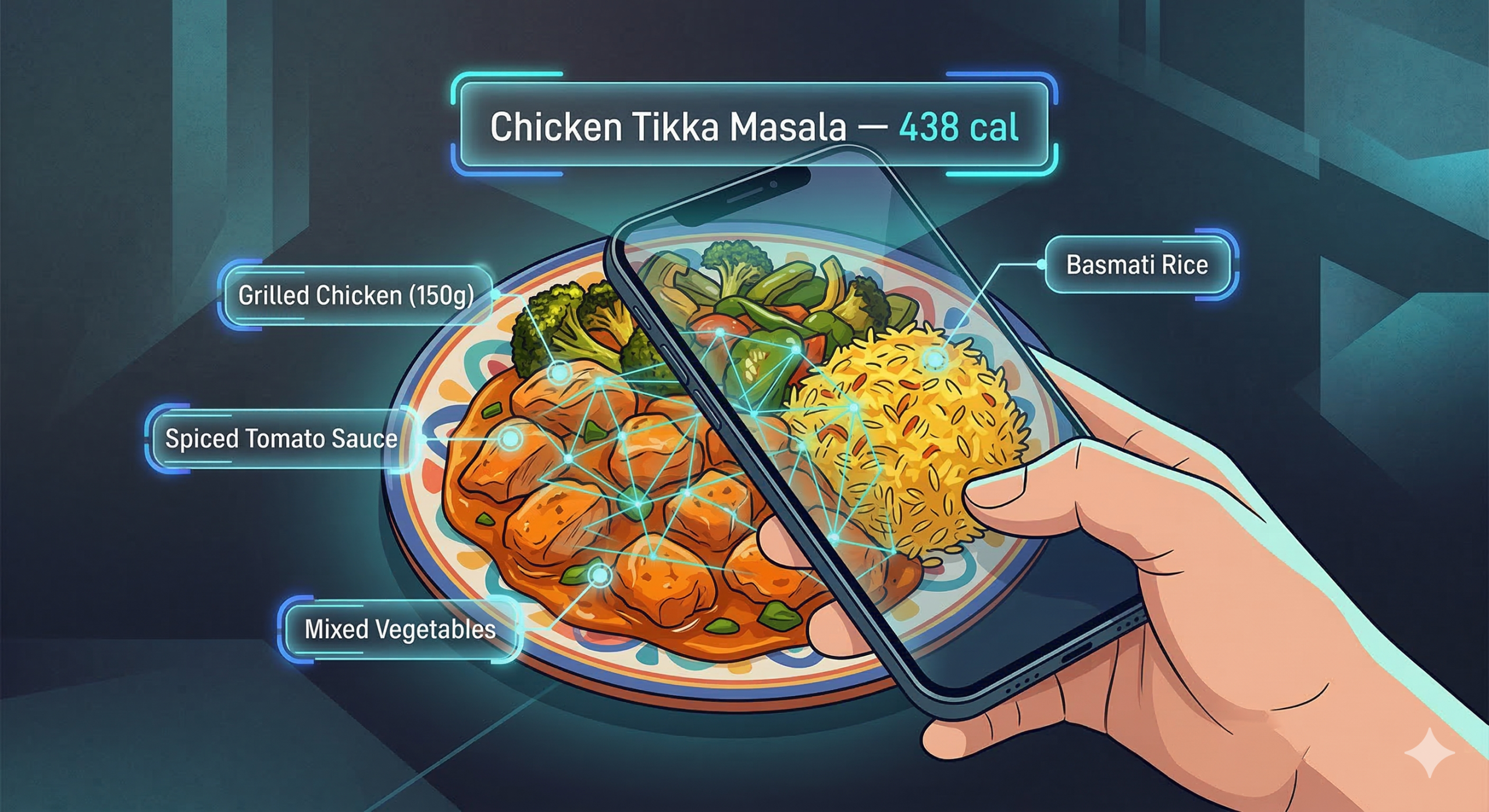
Food Image Recognition in Your App: A Developer's Guide to Visual Food AI
Your users snap a photo of their lunch. Your app identifies the dish, pulls nutrition data, finds matching recipes, and checks for allergens — all in under two seconds. Here's how to build it.
Disclosure: This tutorial uses Foodashi's API for code examples. Foodashi includes built-in AI food recognition powered by Google Gemini, backed by a rapidly growing, professionally-structured recipe catalog spanning 80 cuisines and nutrition computed from 7 official government food-composition databases. Alternative approaches using general-purpose vision models (such as Google Cloud Vision or AWS Rekognition) are discussed for context.
Why Food Image Recognition Matters in 2026
Food image recognition has gone from a research curiosity to a feature users expect. The shift happened gradually, then all at once: health apps added "snap to log" for calorie tracking, social platforms started auto-tagging food posts, and restaurant apps began offering visual menu translation for international travelers.
The numbers tell the story. The global food recognition market is growing rapidly, driven by health-conscious consumers who want frictionless calorie tracking and developers who want to build smarter food experiences. Typing "grilled chicken breast with roasted vegetables" into a search box is friction. Pointing your phone camera at the plate and getting instant nutrition data is not.
For developers, the question is no longer "should we add food recognition?" but "how do we add it without training our own model?" Training a food classifier from scratch requires tens of thousands of labeled food images, GPU compute time, ongoing model maintenance, and expertise in computer vision. For most teams, that's a non-starter. API-based solutions let you add food recognition in an afternoon.
What Developers Are Building
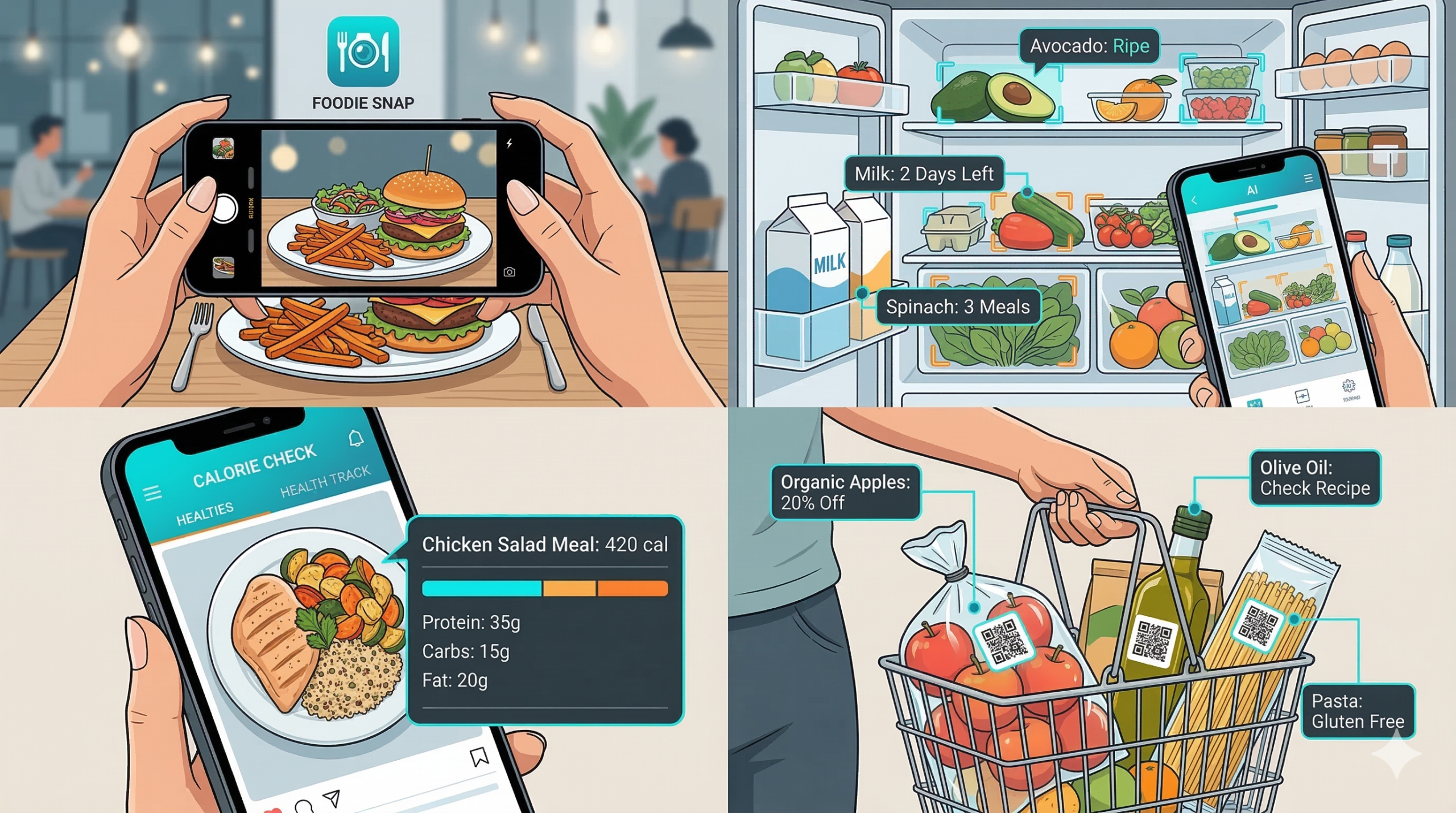
- Calorie tracking apps — users photograph their meals for automatic nutrition logging instead of manually searching a food database
- Recipe discovery — "I ate this dish at a restaurant, find me the recipe" is a feature users love and share
- Dietary compliance tools — snap a meal photo and instantly check if it fits within dietary restrictions or triggers allergen alerts
- Grocery and ingredient identification — photograph the contents of a fridge and get recipe suggestions based on what's there
- Social food features — auto-categorize and tag food photos with cuisine type, dish name, and estimated nutritional info
How Visual Food AI Actually Works
Under the hood, food image recognition uses multimodal AI models — large language models that can process both images and text simultaneously. Unlike older approaches that relied on convolutional neural networks trained on fixed food categories, modern systems use foundation models like Gemini or GPT-4V that understand visual context at a much deeper level.
Here's the simplified pipeline:
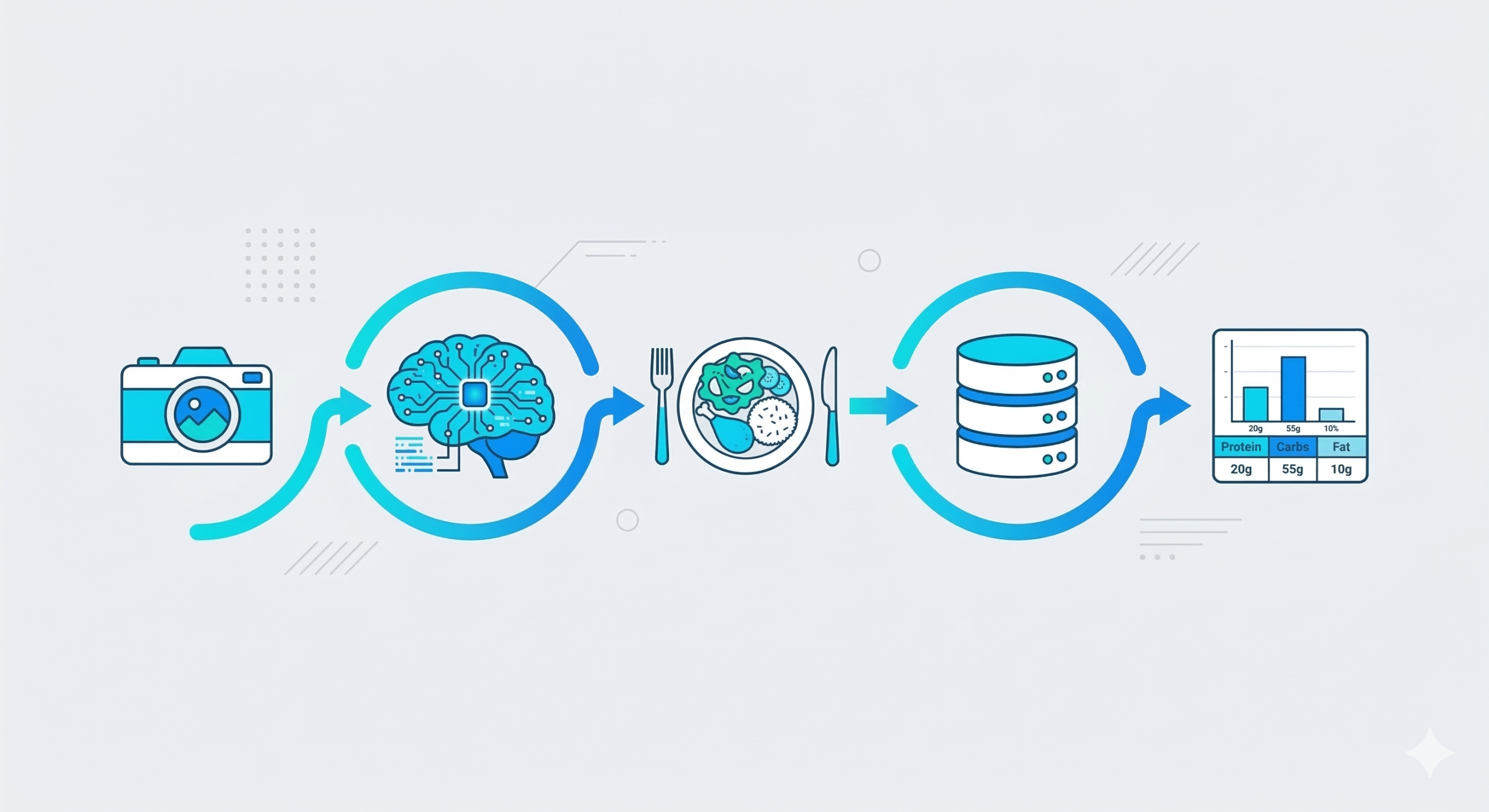
The model receives the image and returns structured data: dish name, confidence score, estimated ingredients, and optionally, matched recipes from a database. The key advantage of API-based food recognition over building your own is that the hard problems are already solved:
- Mixed plates — a plate with rice, chicken, and salad needs to be recognized as a composite meal, not just "food"
- Cultural context — a white bowl of soup could be clam chowder, congee, or vichyssoise depending on visual cues the model has learned
- Partial views — users don't always photograph food from a perfect top-down angle with ideal lighting
- Portion estimation — the model needs to infer approximate serving size from visual context to estimate nutrition
Specialized Food API vs. General-Purpose Vision
General-purpose vision APIs such as Google Cloud Vision, AWS Rekognition, and Azure AI Vision are powerful, well-documented services that are excellent at broad object and label detection across countless categories. They can detect that an image contains food and often return a label like "pizza." What they are not built to do, on their own, is map that label to structured nutrition, match it against a recipe database, or surface allergen and dietary information — those are food-domain concerns outside their general-purpose scope.
A food-specialized recognition API closes that gap by combining vision AI with a structured food database, a nutrition engine, and an allergen-detection pipeline in a single call. So instead of just a label ("pizza"), you can get the dish name, an estimated nutrition breakdown, matched recipes, and allergen flags — the actionable data a food app actually needs. The right choice depends on your use case: reach for a general-purpose vision service when you need broad multi-domain detection, and a food-specialized API when nutrition, recipes, and allergens are the point.
Getting Started
For this tutorial, we'll use Foodashi's food recognition endpoints. The full request and response schemas are in the API documentation, and you can call every endpoint live (no code) in the Test Kitchen. You'll need:
- A Foodashi API key — the AI recognition endpoints are on the Pro tier ($90/month; see the full plans and pricing)
- An image to test with — a photo of any dish or a collection of ingredients
- Any HTTP client — we'll use JavaScript
fetch(), but the API is REST-based and works with any language
Tip: Foodashi's recognition endpoints accept images as base64-encoded strings or image URLs. Base64 is better for mobile apps (direct camera capture), while URLs work great for web apps processing user-submitted links. Max image size is 4MB. Supported formats: JPEG, PNG, WebP, and GIF.
The base URL for all API calls:
https://foodashi.theaidevstudio.workers.dev
Step 1: Snap and Identify a Dish
POST /api/recognize/image
This is the core endpoint. Send a food photo, get back the dish name, confidence score, estimated ingredients, nutrition breakdown, and optionally matched recipes from the database.
const response = await fetch('https://foodashi.theaidevstudio.workers.dev/api/recognize/image', {
  method: 'POST',
  headers: {
    'Content-Type': 'application/json',
    'x-api-key': 'YOUR_API_KEY'
  },
  body: JSON.stringify({
    image_url: 'https://example.com/photos/my-lunch.jpg',
    include_recipes: true,
    max_results: 5
  })
});

const payload = await response.json();
if (!response.ok || !payload.success) throw new Error(payload.error || 'Recognition failed');
const data = payload.data; // every recognition answer is { success, data }
console.log(data.identification.dish_name);
// "Chicken Tikka Masala"
console.log(data.identification.confidence);
// 0.94
The response includes everything you need, inside its data envelope:
{
  "success": true,
  "data": {
  "identification": {
    "dish_name": "Chicken Tikka Masala",
    "confidence": 0.94,
    "cuisine": "Indian",
    "description": "Grilled chicken chunks in a creamy, spiced tomato sauce...",
    "dish_type": "Main Course",
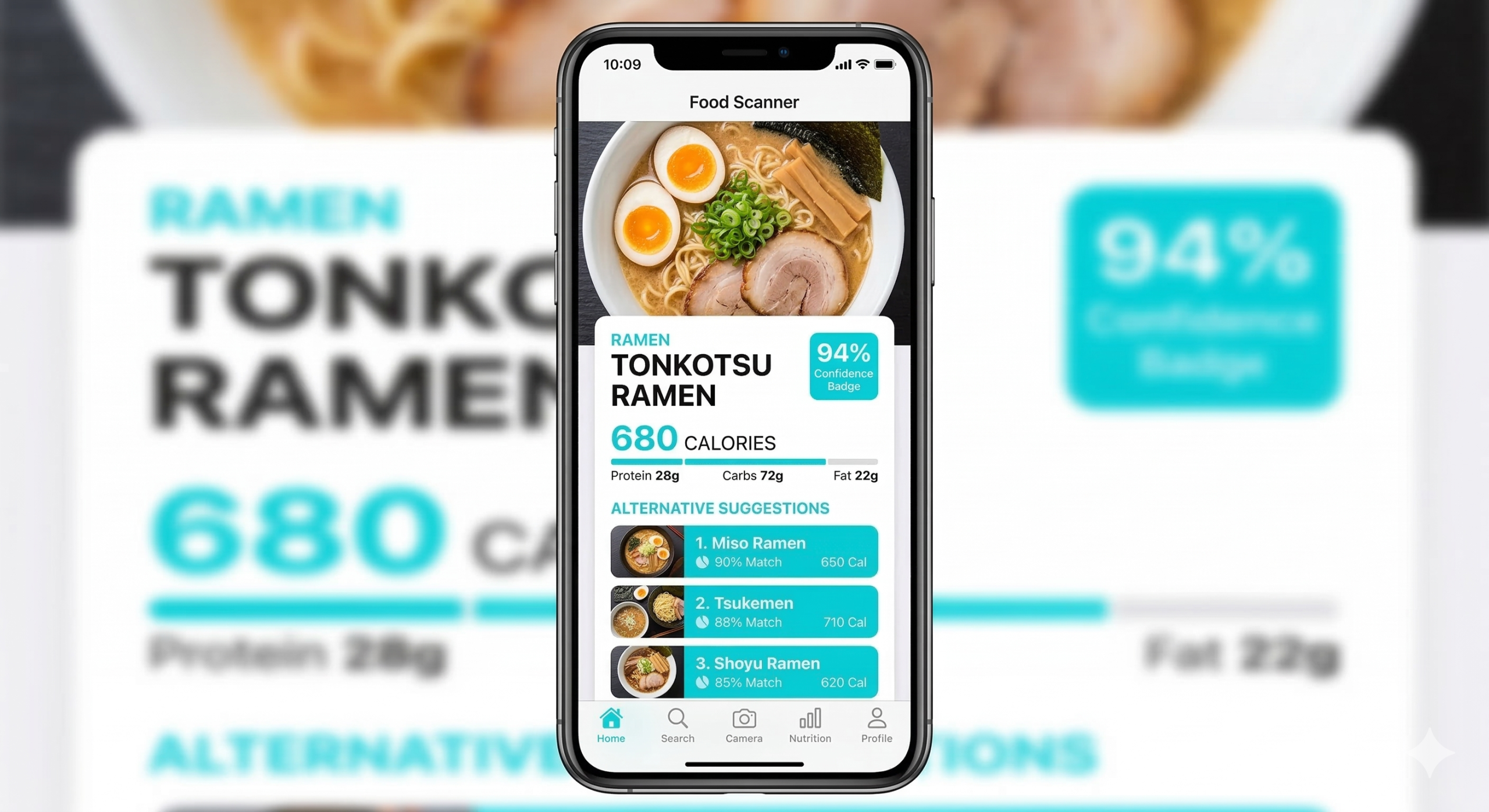
    "alternatives": [
      { "name": "Butter Chicken", "confidence": 0.82 },
      { "name": "Chicken Korma", "confidence": 0.61 }
    ]
  },
  "estimated_nutrition": {
    "calories": 438,
    "protein_g": 32.5,
    "carbs_g": 18.2,
    "fat_g": 26.1
  },
  "estimated_ingredients": [
    { "name": "chicken breast", "estimated_grams": 200 },
    { "name": "tomato sauce", "estimated_grams": 150 },
    { "name": "cream", "estimated_grams": 60 }
  ],
  "matched_recipes": [ /* up to 5 recipe cards, possibly none */ ]
  }
}
Notice the alternatives array. Food recognition isn't always 100% certain — a creamy orange curry could be Tikka Masala or Butter Chicken. Showing users the top alternatives with confidence scores builds trust and lets them correct if needed.
Step 2: Instant Nutrition Lookup
From Photo to Calorie Count
The /api/recognize/image response already includes estimated_nutrition with macros. But for a calorie tracking app, you might want the full per-serving nutrition breakdown that Foodashi computes for its database recipes — including the eight nutrients behind its NutriMetric health score (energy, protein, total fat, carbohydrate, sodium, plus fiber, saturated fat, and sugars).
If the recognition returns matched recipes (which it does by default), each matched recipe in the matched_recipes array includes a recipe ID. You can use that to pull the complete nutrition profile:
// The top matched recipe from the recognition result (data = payload.data above).
// matched_recipes can be empty: offer a search instead of reading [0].
if (data.matched_recipes.length === 0) return showSearchFallback(data.identification.dish_name);
const recipeId = data.matched_recipes[0].id;

const recipe = await fetch(
  `https://foodashi.theaidevstudio.workers.dev/api/recipes/${recipeId}`,
  { headers: { 'x-api-key': 'YOUR_API_KEY' } }
).then(r => r.json());

// GET /api/recipes/{id} answers the recipe itself (no envelope). Nutrition per serving:
console.log(recipe.nutrition);
// { calories: 438, protein_g: 32.5, fat_g: 26.1, saturated_fat_g: 11.2, carbohydrate_g: 18.2,
//   fiber_g: 2.8, sugars_total_g: 6.4, sodium_mg: 580, per_100g: { ... } }

// Allergens detected (EU-14 names)
console.log(recipe.allergens);
// ["Dairy"]

// Dietary tags
console.log(recipe.dietary_tags);
// ["High-Protein"]
This two-step chain — photo → dish identification → full recipe nutrition — gives your users a complete picture of what they're eating from a single photo. The estimated nutrition from the vision model gets you in the right ballpark instantly; the matched recipe gives you the precise, database-sourced breakdown for accuracy.
Step 3: Recipe Matching
From "What Is This?" to "How Do I Make It?"
One of the most engaging features you can build is "I ate this dish, show me the recipe." The recognition endpoint already returns matched recipes, each with enough data to render a recipe card:
{
  "matched_recipes": [
    {
      "id": "a1b2c3d4-...",
      "title": "Classic Chicken Tikka Masala",
      "image_url": "https://foodashi.theaidevstudio.workers.dev/images/...",
      "cuisine": "Indian",
      "meal_type": "dinner",
      "total_time_minutes": 45,
      "difficulty": "Medium",
      "dietary_tags": ["High-Protein"],
      "servings": 4
    }
  ]
}
Users love this flow. They photograph a dish at a restaurant, your app identifies it, and immediately shows them how to recreate it at home — with full ingredients, step-by-step instructions, and nutritional information. It's a retention-driving feature that turns passive food photography into active cooking engagement.
Step 4: Ingredient Detection from Photos
POST /api/recognize/ingredients
Beyond identifying finished dishes, Foodashi also offers an ingredient recognition endpoint. Users photograph the contents of their fridge, a grocery haul, or raw ingredients on a cutting board, and the API identifies each ingredient individually.
const response = await fetch('https://foodashi.theaidevstudio.workers.dev/api/recognize/ingredients', {
  method: 'POST',
  headers: {
    'Content-Type': 'application/json',
    'x-api-key': 'YOUR_API_KEY'
  },
  body: JSON.stringify({
    image_url: 'https://example.com/photos/my-fridge.jpg',
    include_recipes: true,
    max_results: 5
  })
});

const payload = await response.json();
if (!response.ok || !payload.success) throw new Error(payload.error || 'Recognition failed');
const data = payload.data; // { success, data } here too
console.log(data.ingredient_count);
// 7
console.log(data.ingredients[0]);
// { name: "bell pepper", category: "vegetable",
//   freshness: "fresh", confidence: 0.91,
//   canonical_match: { id: "...", name: "bell pepper" } }
The response includes each detected ingredient with its category, estimated weight, freshness assessment, and a match to Foodashi's canonical ingredient database (backed by 7 official government food-composition databases for accurate nutrition). It also returns suggested recipes from the catalog that use those ingredients and suggested cuisines based on the ingredient combination.
This powers the "what can I cook with what I have?" feature — one of the most requested features in recipe apps, now driven entirely by a camera snap instead of manual ingredient entry.
Putting the Full Pipeline Together
The real power emerges when you chain multiple endpoints. Here's the complete flow from a single food photo to a full meal-tracked, recipe-matched, shopping-ready experience:
In practice, your app flow looks like this:
- User takes a photo of their meal or ingredients
- Your app calls
/api/recognize/image— gets dish name, confidence, estimated nutrition, and matched recipe IDs - Display the result — show the identified dish with confidence score and alternatives for the user to confirm or correct
- Fetch full recipe details — use the matched recipe ID to get complete instructions, ingredients, and the per-serving nutrition breakdown
- Check dietary safety — the recipe data includes allergen flags (the 14 EU allergens) and 55 dietary tags, so you can instantly warn users about conflicts with their dietary profile
- Optional: generate a shopping list — if the user wants to cook the matched recipe, call
/api/shopping-list/optimizewith the recipe ID to get a categorized grocery list
All of this happens with standard REST calls. No machine learning infrastructure, no model training, no GPU servers. Just HTTP requests and JSON responses.
Important note on accuracy: Food image recognition is probabilistic, not deterministic. A photo taken in poor lighting, at an unusual angle, or of a dish the model hasn't encountered will produce lower confidence scores. Always show confidence levels to users and provide a way to correct or manually search. Never rely solely on image recognition for allergen-critical decisions — always confirm with the user.
Real-World Use Cases
Here's where food image recognition creates the most value in production apps:
Calorie Tracking
Replace manual food logging with snap-to-track. Users photograph every meal; your app logs calories and macros automatically. The estimated nutrition from recognition gets users started instantly, with the option to select a matched recipe for higher accuracy.
Recipe Discovery
"I tried this amazing dish — how do I make it at home?" Photo recognition identifies the dish and instantly surfaces matching recipes with full instructions and ingredients. A retention-driving feature that turns casual food photography into cooking engagement.
Dietary Compliance
For users with food allergies or dietary restrictions, photograph a meal before eating to check for potential allergen conflicts. The recognition pipeline chains into allergen detection (the 14 EU allergens) for immediate safety feedback.
Smart Pantry
Photograph fridge contents or a grocery haul. The ingredient recognition endpoint identifies each item, matches them to canonical ingredients, and suggests recipes that use what you already have — reducing food waste and simplifying meal planning.
Beyond Consumer Apps
Food recognition also has B2B applications: restaurant menu digitization (photograph dishes to auto-generate nutrition labels), food delivery QA (verify delivered orders match what was ordered), and food industry compliance (auto-document food items for regulatory records). The same API powers all of these — the difference is how you integrate the response data into your workflow.
Conclusion
Food image recognition has reached a practical tipping point. The models are accurate enough to be useful, the APIs are accessible enough to integrate in a day, and user expectations have shifted to the point where "snap to track" is becoming table stakes for food apps.
The key insight for developers is that food recognition alone isn't the feature — it's the gateway. The real value comes from what you chain after identification: nutrition data, recipe matching, allergen checks, dietary compliance, and shopping list generation. A single photo becomes the entry point to an entire ecosystem of food intelligence.
If you're building a health app, a recipe platform, a grocery service, or anything that touches food data, image recognition is worth evaluating. The technical barrier is gone. The question now is how creatively you integrate it into your user experience.
Still choosing a backend for the rest of your food data? See our roundup of the best recipe APIs for developers in 2026 and our in-depth recipe API comparison guide for a side-by-side look at pricing models, nutrition coverage, and free tiers.
Discover Foodashi
A rapidly growing, professionally-structured recipe catalog across 80 cuisines, AI food recognition, 70+ endpoints, and nutrition computed from 7 official government databases — from photo to nutrition data in one API call. See the plans and pricing, browse the API documentation, or try the endpoints live in the Test Kitchen.
Discover FoodashiDisclaimer: This tutorial is published by Foodashi and uses Foodashi's API for code examples. Food image recognition is probabilistic and should not be used as the sole basis for medical, allergy, or dietary decisions. Allergen indicators are algorithmically inferred from ingredient analysis and are not a substitute for professional allergen testing or medical advice. Nutrition data is database-sourced and provided as estimates, not laboratory-verified values. Always consult qualified healthcare professionals for allergy-critical or medical dietary requirements. Foodashi pricing and features, and any references to third-party services (such as Google Cloud Vision, AWS Rekognition, or Azure AI Vision), reflect publicly available information as of June 2026 and are subject to change — check each provider's official site for current details. Third-party product names are mentioned for comparison and identification only and do not imply any affiliation or endorsement.
